Tap-first SOAP notes built for field practice
For animal chiropractors who work
at the barn.
Build complete SOAP notes with a five-step workflow, capture structured notes offline, track veterinary authorizations, schedule visits, invoice owners, and manage follow-up in one app.
No credit card · Every feature included · $49.99/month after trial
Five-step tap-first SOAP workflow
Structured note capture works offline
Signed notes protected from ordinary edits
Veterinary authorization tracking
See Chiro Stride in action
Tour the workflow in under a minute
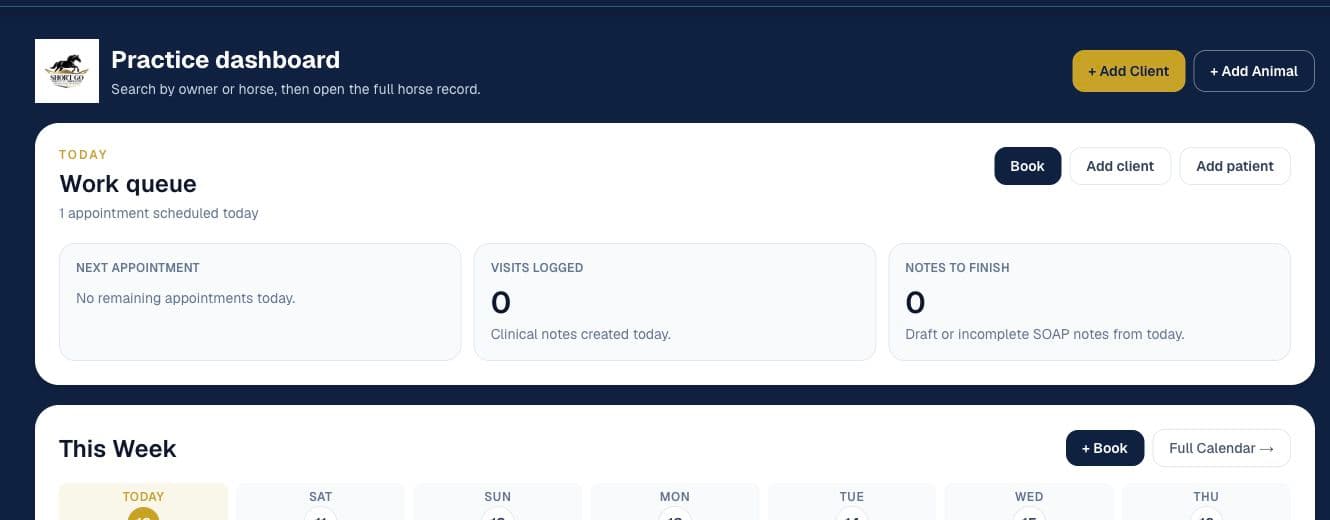
Follow the dashboard, patient record, tap-first SOAP workflow, spine assessment, anatomy viewer, scheduler, and invoice flow using live-product screens with synthetic data.
Read the product tour transcript
- Practice dashboard: Run the day from one field-ready workspace.
- Patient record: Keep forms, notes, images, and history attached to the animal.
- Tap-first SOAP: Build a structured note without starting from a blank page.
- Spine assessment: Record the region, side, and finding modifier.
- Interactive anatomy: Switch between horse and canine models, rotate them, and control clinical layers in real time.
- Scheduling: Choose an open time, complete the form, and see the saved appointment.
- Invoicing: Select the owner and patient, add a service, review, and create a draft invoice.
Interactive anatomy
Scheduling
Invoice creation
Product demonstrations use fictional names, contact details, appointments, and amounts. No real client was contacted, billed, or charged. Some steps are shortened for pace, and interface details may change.
Features
The full practice in one app
Every feature follows the real visit workflow — from field notes through owner follow-up.
Voice Dictation
When you have a connection, dictate findings into the SOAP workflow with transcription primed for chiropractic anatomy and technique vocabulary. Review every field before finalizing.
Tap-First SOAP Wizard
Five guided steps — Note Info, History, Exam, Treatment, Plan — turn structured selections into editable SOAP prose. Drafts autosave and resume where you left off.
Protected Signed Notes
Move a note from draft to finalized to signed. Database controls protect signed records from ordinary editing and deletion while keeping the practitioner in control of the workflow.
Owner Summary Emails
Preview and send an owner-friendly visit recap after a finalized or signed visit. You decide when the message is ready to go.
Spine Assessment
Species-specific spinal maps for equine, canine, goat, and more. Flag subluxation findings, track them visit-to-visit, and show progress over time.
Day Prep & Route Planning
Your day at a glance: route order, unconfirmed appointments, what's next. Built for practitioners going barn-to-barn.
Scheduling
Book appointments, send email or SMS reminders, and give clients a one-tap confirmation link.
Digital Intake & Consent
Send intake and consent forms by text or email. E-signatures built in. Signed copies attach to the patient record automatically.
Offline Mode
Capture structured notes, photos, appointments, and other queued changes without cell service. Changes sync after reconnecting; voice transcription and Sign & Lock require a connection.
Online Payments (Stripe Connect)
Create payment links owners can open on their phones. When Stripe Connect is enabled, eligible payments settle through the practice's connected Stripe account.
QuickBooks Sync
Connect QuickBooks Online and choose whether newly created invoices sync automatically. Recorded payments can also be synced from supported payment workflows.
Vet Authorization & Referrals
Send digital authorization or referral requests, collect e-signatures, and track expiration dates. Chiro Stride helps document the workflow; practitioners remain responsible for verifying local requirements.
Communication Log
Keep email and SMS activity in one searchable log. Email can advance through delivery or bounce events; SMS records show when a message was accepted for sending or failed.
Google Review Link Requests
Send a review-request link to clients by email or SMS from the owner record. Track when a request was sent; the recipient decides whether to leave feedback.
Inside Chiro Stride
The patient record and SOAP workflow stay connected
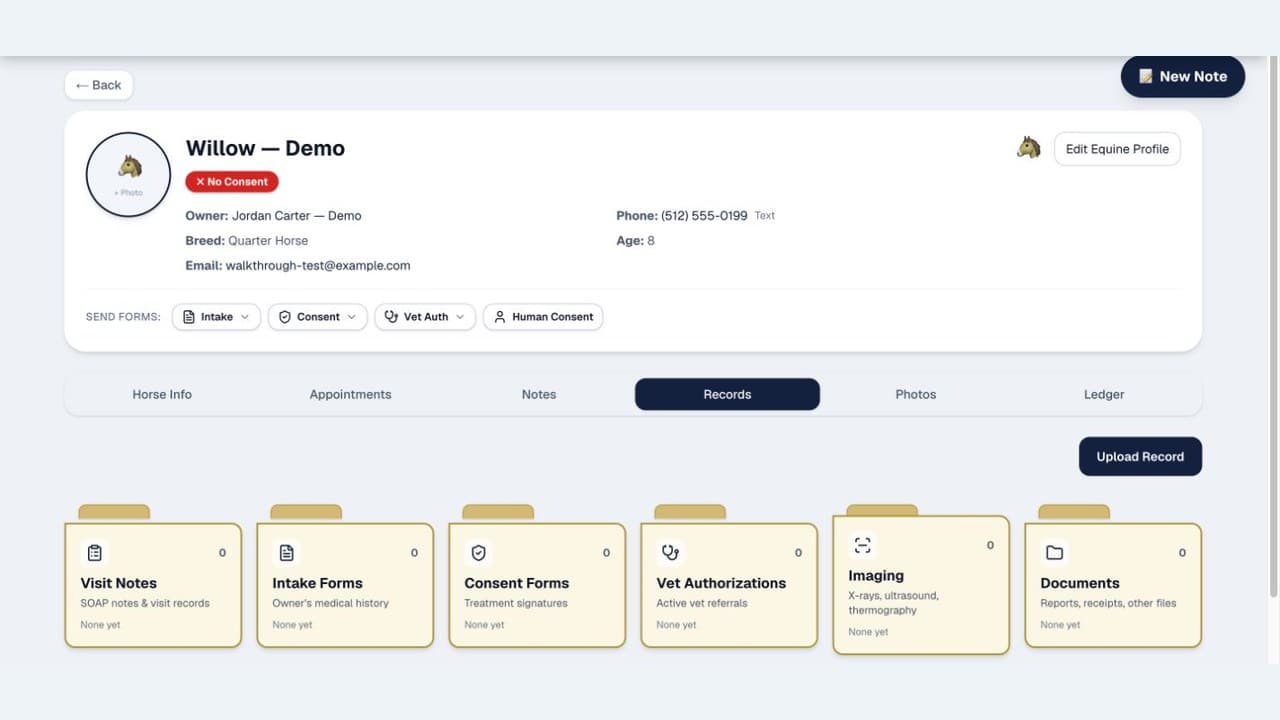
Open one animal record to reach forms, notes, imaging, documents, appointments, and the five-step visit workflow. These screens were captured from the live app using synthetic demonstration data.
Patient record
Every document organized around the animal
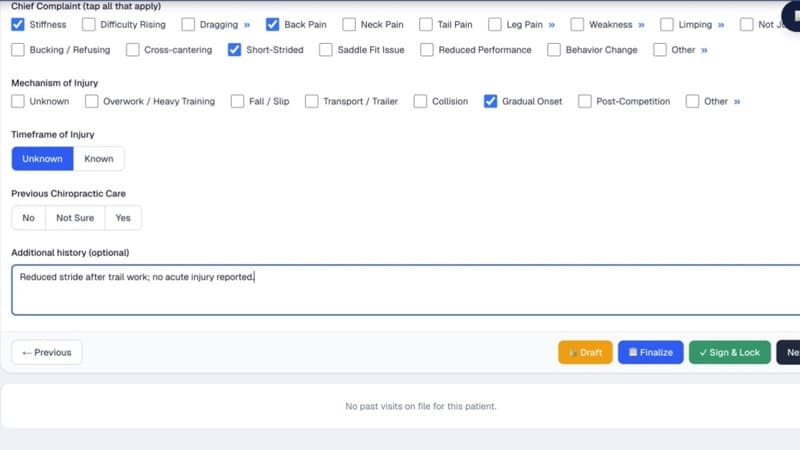
Tap-first SOAP
Structured choices instead of a blank note
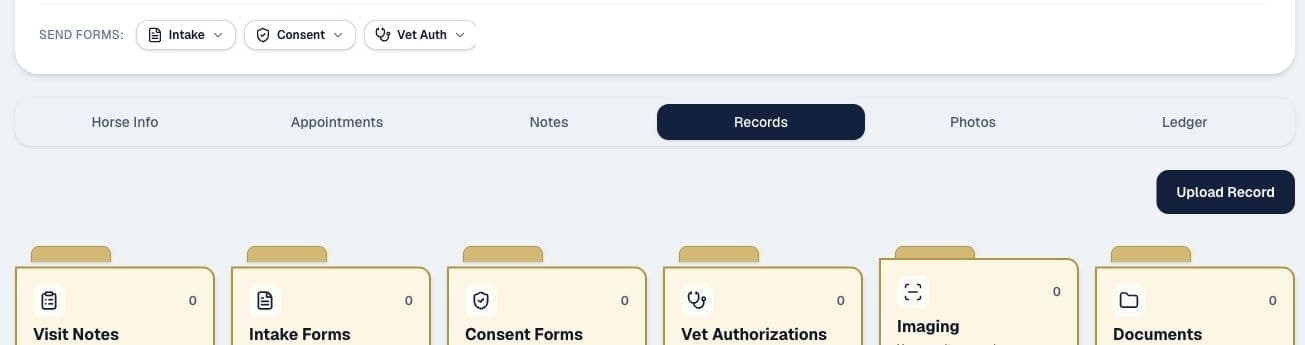
Forms and records
Intake, consent, veterinary authorization, imaging, and notes stay together
Structured selections, transcription, and generated text are editable drafts. Review, correct, and approve all documentation before relying on it, signing a record, or sending it to an owner or veterinarian.
Interactive Anatomy
Draw on the body. Show the owner what you found.
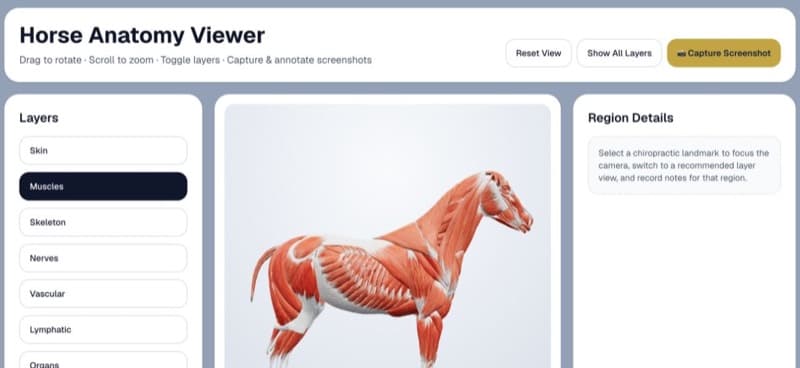
Draw directly on the interactive equine or canine 3D anatomy model. Circle problem areas, add arrows, and write notes. Switch between clinical terminology and owner-friendly language for patient education.
Toggle the clinical layers available for each species
Draw, circle, and annotate directly on the model
Owner-friendly mode for client education
Save annotations per visit for progress tracking
NEW
How It Works
Three steps. That's it.
01
Add your patients
Create profiles for any species you treat — equine, canine, goat, bovine, and beyond — with breed, discipline, medical history, and photos.
02
Document visits
Walk the 5-step SOAP wizard — tap-first, autosaved, and ready for connected voice dictation. Finalize the note, then Sign & Lock when you have a connection.
03
Engage clients
Send intake forms, consent forms, and appointment reminders via email or text.
Who this is for
Built for the practitioner who works at the barn
The workflow is designed around the practical demands of field-based animal chiropractic care.
Ambulatory equine chiropractors
Multi-barn days, uneven cell service, and one hand on a horse. Capture structured notes offline, plan the route, then use voice transcription or Sign & Lock when connected.
Mixed-species & companion practitioners
Manage canine, feline, goat, bovine, porcine, exotic, and other patients with species-aware profiles and spine maps, plus dedicated equine and canine 3D anatomy models.
Solo and independent practices
Keep documentation, scheduling, forms, invoicing, and owner communication together without building a patchwork of spreadsheets. The trial does not require a card.
Scheduling
The whole week in one calendar
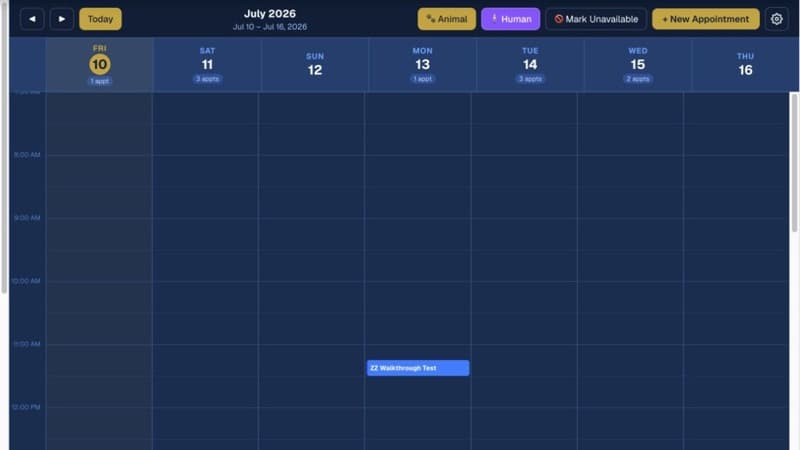
Drag-to-reschedule, automatic email reminders, consent-gated SMS reminders, and a Day Prep panel that puts your route in the right order before you start the truck.
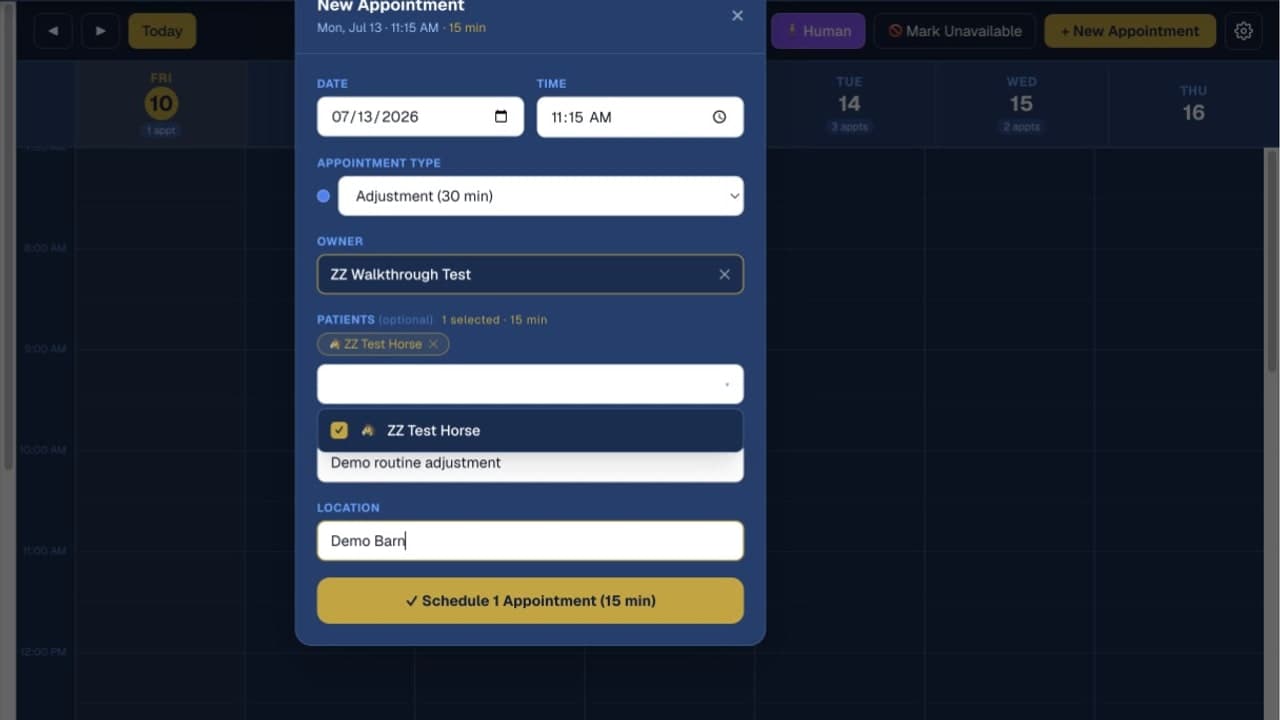
Quick booking
Date, visit type, owner, reason, and barn in one form.
Full calendar view with day, week, and month layouts
Automatic email plus consent-gated SMS reminders
One-tap confirmation links for clients
Track appointment history per patient and owner
Works Offline
No signal? No problem.
Capture structured notes and supported queued changes at the barn, the arena, or anywhere service drops. Changes sync after you reconnect; voice transcription, messaging, payments, and Sign & Lock need a connection.
Install on your phone
Capture supported work offline
Sync after reconnecting
One workflow
From visit notes to owner follow-up
Keep the clinical record and the business tasks around it connected, without re-entering the same visit across separate tools.
01
Capture
Build the SOAP note from structured selections, photos, and connected voice dictation.
02
Finalize
Review the record, finalize it, and use Sign & Lock when connected.
03
Invoice
Create the visit invoice and, when configured, share a Stripe payment link.
04
Follow up
Preview the owner summary and send it when it is ready.
Pricing
One plan. Everything included.
Built for solo animal chiropractic practices
$49.99/month
or $399/year (save about 33% versus 12 monthly payments)
30-day free trial · No credit card required
Unlimited patients & visits — every species we support
5-step tap-first SOAP wizard + connected voice dictation
Autosaved drafts + protected signed clinical notes
Owner summary preview and on-demand email
Species-specific spine assessments + equine and canine 3D anatomy
Day prep & route planning
Digital intake, consent & vet authorization (with referral links)
Two-way SMS, email, and a searchable communications log
Offline capture + installable PWA
Stripe payment links + optional QuickBooks Online sync
Reports, communications log, and review-link requests
The card-free trial does not auto-convert. Paid subscriptions begin only after you choose a plan and enter payment, then renew until you cancel renewal. Taxes and separate integration terms or fees may apply.
Security controls
Protection built into the record workflow
Encrypted Connections
Connections to Chiro Stride use modern TLS encryption while data is in transit.
Supabase-Hosted Infrastructure
Chiro Stride uses Supabase-hosted database and authentication infrastructure with practice-isolated access controls.
Practice-Isolated Access
Row-level access policies separate one practice's records from another practice's records.
Protected Signed Records
Signed clinical notes are protected from ordinary editing and deletion at the database layer.
FAQ
Frequently asked
Is Chiro Stride an EMR / EHR for animal chiropractors?
Yes. Chiro Stride is a purpose-built animal chiropractic EMR/EHR for equine, canine, goat, bovine, porcine, feline, exotic, and other species. It combines tap-first SOAP documentation, patient histories, intake, consent, veterinary authorization tracking, scheduling, invoicing, payments, and owner communication. Structured visit capture works offline; connected services such as voice transcription, email, payments, and Sign & Lock resume when you have a connection.
How does the free trial work?
Sign up with your email — no credit card required. You get full product access for 30 days. The trial does not auto-convert or charge you; paid access begins only if you choose a plan and enter payment details.
Can I switch between monthly and annual billing?
Yes! You can switch at any time from your account settings. When you switch to annual, you'll save about 33% compared to monthly billing.
Is there a limit on patients or SOAP notes?
No limits. Add as many patients (any species), generate as many SOAP notes, and book as many appointments as you need. Everything is unlimited.
Which species are supported?
Equine, canine, feline, bovine, porcine, caprine (goat), exotic, and a free-text "other" category. Profiles and spine mapping adapt by species; the interactive 3D anatomy viewer includes dedicated equine and canine models.
Where do my payments land?
Practices can connect their own Stripe account through Stripe Connect. When connected, eligible owner payments settle through that account. Stripe onboarding is available from the Account page.
Does it work on my phone?
Chiro Stride is a Progressive Web App. Install it on your iPhone, Android, or tablet — it looks and feels like a native app. No app store required.
What about offline use?
Chiro Stride has a built-in offline mode for structured note capture and supported queued changes. To sign in without a signal, first enable Biometric Login under Account → Security while you're online and complete a Face ID, Touch ID, or fingerprint sign-in on that device. Password sign-in requires an internet connection. Offline changes sync when connectivity returns; voice transcription, sending messages, payments, and Sign & Lock also require a connection.
Coming from spreadsheets?
You won't miss the tabs
A spreadsheet can't e-sign a consent form, protect a signed clinical note, or send a payment link. Chiro Stride keeps those tasks in the same workflow.
Faster intake
Send a digital form by text. Owner signs on their phone. Their answers land in the patient record automatically.
Real clinical records
Review and sign a finalized clinical note, then protect it from ordinary edits while keeping a clear time-stamped record.
Reports that actually balance
Review A/R by owner, monthly revenue, and services rendered, with optional QuickBooks Online sync when connected.
Put the next visit in one workflow.
Start your free trial.
Try the complete product for 30 days and decide whether it fits the way you practice.
30-day free trial · No credit card required