Going Paperless: A Guide for Animal Chiropractic Practices
The moment you stop printing an intake form is the moment your practice changes. No more clipboards at the barn. No more filing cabinets. No more hunting through paper records. No more forms lost in the mail.
Going paperless isn't just about tidiness. It can make records easier to search, organize, protect, and retrieve. Offline availability depends on the software and on which records were previously synced to the device.
But the transition from paper to digital can feel overwhelming if you haven't done it before. This guide walks you through the process, covering intake forms, consent, vet authorizations, and the operational changes you'll need to make.
The Case for Going Paperless
Before we dive into the how, let's be clear about the why:
Efficiency. Digital forms populate patient records automatically. No manual data entry. Owners fill out intake forms on their phone, and the information flows directly into their chart.
Documentation. Electronic-signature tools can capture a signature, timestamp, and retained copy. Whether a particular electronic form or signature satisfies an applicable requirement depends on the law, attribution process, delivery method, and record-retention rules involved.
Field-friendly. Some practice-management tools keep previously synced records and in-progress clinical drafts available when the signal drops. Owner-facing forms, signatures, transcription, delivery, and syncing may still require a connection.
Client experience. Owners appreciate not having to fill out the same form at every visit. They fill it once; you've got it.
Searchability. Need to find all horses with a history of lameness? Digital records let you search by field. Paper? Good luck.
Backup and security. A well-configured digital system can add encryption, access controls, and managed backups. Confirm the provider's safeguards, retention settings, export options, and your own device-security responsibilities.
Reduced costs. No printing, no filing, no storage space. Savings add up over time.
Phase 1: Assess Your Current Workflow
Before transitioning, document what you're currently doing:
- What forms do you use? (intake, consent, vet authorization, follow-up assessment, discharge)
- When do you collect forms? (before first visit, at each visit, only for specific scenarios)
- How do you store records? (filing cabinets, binders, boxes)
- Who accesses records? (you, assistant, vets, owners)
- What information do you collect? (medical history, medications, prior injuries, contact info, payment details)
Write it down. You'll need this reference as you transition to digital.
Phase 2: Choose Your Platform
Your platform choice is critical because it affects how easily you can digitize your entire workflow.
Look for software that supports:
- Digital intake forms that can be sent via text or email
- E-signature support for consent and authorization
- Clear offline behavior for records and drafts, including which actions still need a connection
- Auto-population of patient records from form data
- Custom forms so you can adapt them to your workflow
- Multi-device access (phone, tablet, desktop)
Standalone form tools can work for intake, but they may leave you manually transferring information into patient records.
Purpose-built practice management software for animal chiropractors handles the entire pipeline: form creation, collection, e-signature, patient record population, and clinical documentation.
Phase 3: Digitize Your Forms
Start with the core forms your workflow and jurisdiction require:
Intake Form
Your intake form should collect:
- Owner/contact info (name, phone, email, address)
- Patient info (name, species, breed, age, color, identifying marks)
- Medical history (prior injuries, surgeries, conditions, medications)
- Discipline/work (what the animal does, activity level)
- Reason for visit (chief complaint, onset, pattern)
- Veterinarian info (name, clinic, phone, authorization status)
- Emergency contact
Digital tip: Break your form into sections so owners don't feel overwhelmed. Mobile-friendly forms with progress bars feel less intimidating than scrolling walls of text.
Consent Form
Your consent form should:
- Explain the proposed care in language appropriate for your scope and jurisdiction
- Disclose applicable limitations
- Address risks identified by your qualified clinical or legal reviewer
- Request permission for photo documentation
- Confirm the owner authorizes treatment
- Include an appropriate signature process, date, retained record, and delivery method
Regulatory note: Consent requirements vary by state. Check your local regulations before finalizing your form.
Vet Authorization Request
Veterinary-authorization requirements vary by jurisdiction, profession, and circumstance. If authorization is required for your workflow, your digital process can:
- Ask the owner to provide their vet's contact info
- Explain why authorization is needed (state law, safety)
- Provide a digital form the vet can sign and return (via email, text, or portal)
- Allow you to track authorization status and expiration
Process tip: If your jurisdiction requires veterinary authorization, a digital workflow can surface recorded expiration dates and reduce manual follow-up. It does not determine whether the authorization is sufficient or guarantee that a deadline will not be missed.
Phase 4: Transition Owners to Digital
You can't go paperless if your owners are still expecting paper. Here's how to transition:
Phone calls. When owners book their first appointment, mention that forms are digital. "We'll send you a quick intake form via text—takes about 3 minutes on your phone."
SMS and email. Send form links 24 hours before the appointment. Include a note: "Please fill this out before your appointment so we're all set when we arrive."
At the barn. If an owner shows up without completing the form, send it via text right then. Most owners will fill it out on their phone while you're getting equipment ready.
Positive framing. Owners often prefer digital. "No paperwork at the barn" is a selling point, not a burden.
Fallback option. For owners who genuinely can't or won't go digital, keep a tablet with the form ready. Not ideal, but it beats losing a patient.
Phase 5: Set Up Your Offline Workflow
Here's where "paperless" gets practical for field practitioners:
Your practice-management software should clearly identify what it caches on your device and what it can sync after you reconnect.
Offline checklist:
- View previously synced patient information and histories without internet ✓
- Record structured assessments and save in-progress SOAP drafts without internet ✓
- Confirm when the last successful sync occurred ✓
- Reconnect before online transcription, signing, form delivery, or other connected actions ✓
When you reconnect, verify that queued changes have synced before signing, sending, or relying on them elsewhere.
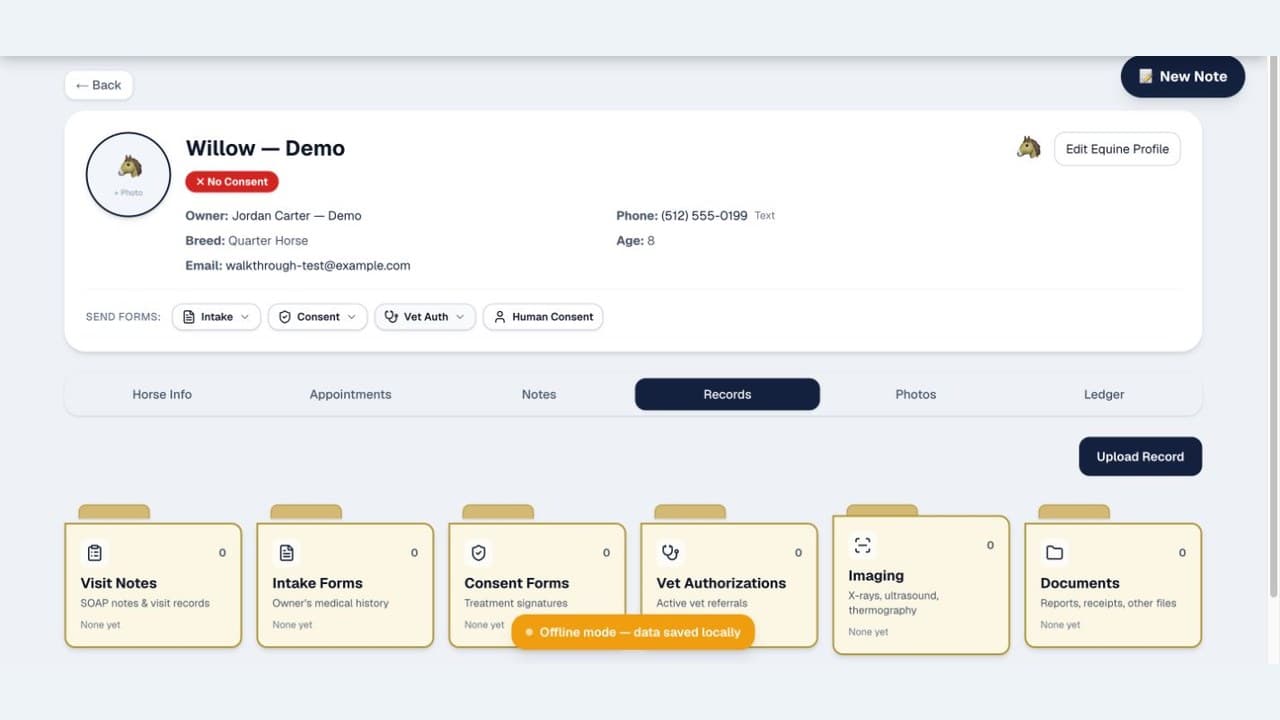
This is an important difference for field practices. See exactly what ChiroStride keeps available offline and what requires a connection. This is especially useful for equine practitioners working at remote barn locations.
Phase 6: Adapt Your In-Practice Process
Going digital means changing some habits:
Before: Owner brings clipboard with printed form, hands it to you, you file it.
After: Owner receives form link, fills it out on their phone, data appears in their digital chart.
Before: You write notes on paper during/after treatment, transcribe them that evening.
After: You make structured selections, optionally use online transcription, review the editable draft, and approve the final note.
Before: You mail vet authorization forms; follow up via phone; file responses in a cabinet.
After: You send a digital authorization request, retain the completed record, and track recorded status or expiration details. The practitioner remains responsible for confirming legal sufficiency.
Before: You invoice by hand or spreadsheet; client pays by check.
After: You generate an invoice in software and can send it by email. Optional connected payment processing depends on provider setup, availability, and fees.
Before: You file old charts in a storage closet.
After: Everything is in the cloud, searchable, backed up.
Some of these changes feel awkward at first, so adopt them in stages and verify each workflow before retiring its paper fallback.
Phase 7: Archive Old Records
What do you do with all that paper?
- Scan important records (vet reports, x-rays, authorization documents) if you need them for future reference.
- Dispose of confidential paper securely only after verifying the retention period and destruction rules that apply to the record.
- Organize as you go. Don't let paper pile up. Digital-first from this point forward.
You may not need to digitize every old paper record. Decide what to retain, scan, export, or securely destroy based on the rules and business needs that apply to your practice.
Common Challenges and Solutions
Challenge: Owners prefer paper and don't want to use their phone.
Solution: Provide a tablet with the form ready. It's not ideal, but it's progress.
Challenge: You're worried about losing records if the internet goes down.
Solution: Use a platform with documented local-draft and cloud-sync behavior, then verify sync status and maintain an appropriate export or backup process. No system eliminates every risk of data loss.
Challenge: You're not comfortable with e-signatures.
Solution: Electronic records and signatures can be valid, but the applicable consent, attribution, delivery, retention, and jurisdiction-specific requirements still matter. The software supports the workflow; it does not make the practitioner compliant by itself.
Challenge: Your insurance or license requirements worry you about digital records.
Solution: Compare the actual safeguards, access controls, retention, export, and audit features of the digital system with your paper process. Confirm requirements with the applicable board and qualified counsel.
The Financial Impact
Going paperless has real costs:
- Software subscription
- Initial setup, migration, and training time
And real savings:
- Eliminated printing costs (forms, paper, ink)
- Eliminated filing cabinets and storage
- Reduced time on administrative tasks (data entry, filing, searching)
- Faster invoicing and payment collection
- Fewer late payments (automatic reminders, digital payment options)
The financial result depends on your volume, labor costs, payment workflow, and how consistently the software is used. Measure your own administrative time and collection cycle before and after the change.
Timeline: From Paper to Paperless
Month 1: Set up digital forms, send to existing owners, start new owners digital.
Month 2: Transition all new patients to digital intake. Existing patients get forms on next visit.
Month 3: Train yourself on SOAP note documentation and clinical workflow.
Month 4: Review the results and retire paper only where the digital workflow is reliable and your retention obligations are satisfied.
This is an example rollout, not a guaranteed timetable. Smaller practices may move faster; complex records or regulatory requirements may take longer.
Going Paperless Is a Practice Upgrade
The shift from paper to digital isn't just about sustainability or aesthetics. It's a genuine upgrade to how you practice.
A well-implemented system can reduce repetitive administration, make records easier to search, and create a more consistent client workflow. Security and compliance still depend on configuration, policies, vendor safeguards, and practitioner review.
The transition is manageable if you take it step by step. Pick a platform, digitize your forms, set up offline sync, and commit to digital-first.
Start with one workflow, verify it end to end, and expand from there.